FS#79992 - [mat2] Dolphin browser integration issues
Attached to Project:
Arch Linux
Opened by Robert D. (exaCORE) - Wednesday, 18 October 2023, 02:16 GMT
Last edited by kpcyrd (kpcyrd) - Wednesday, 18 October 2023, 09:05 GMT
Opened by Robert D. (exaCORE) - Wednesday, 18 October 2023, 02:16 GMT
Last edited by kpcyrd (kpcyrd) - Wednesday, 18 October 2023, 09:05 GMT
|
Details
Description: The dolphin browser integration has issues
seemingly due to a few missing components in the package.
The issues are as follows
1. KDialog is not included as a dependency of mat2. This causes issues with the Dolphin file browser integration, which won't work at all until KDialog is installed. This could cause frustration for some users. As soon as I installed KDialog the issue was resolved (the .desktop file for the Dolphin integration runs a KDialog command). 2. The mat2 logo does not appear in the popup menu in the Dolphin file browser. The logo shown here (https://0xacab.org/jvoisin/mat2/-/blob/master/data/mat2.svg) should be present. When looking at "/usr/share/kservices5/ServiceMenus/mat2.desktop", it assigns the icon as "/usr/share/icons/hicolor/scalable/apps/mat2.svg", but the mat2 package on the Arch Linux official repositories does not seem to install the icon at all. The icon is available at this link on the mat2 gitlab page: https://0xacab.org/jvoisin/mat2/-/blob/master/data/mat2.svg Additional info: * package version(s): 0.13.4 * config and/or log files etc. * link to upstream bug report, if any Steps to reproduce: KDialog issue: 1. Do not have KDialog installed 2. Have Dolphin file browser installed 3. Install mat2 from the official Arch Linux repositories 4. Restart/open Dolphin and right click on a photo file (or another compatible file type) 5. Click on "Clean Metadata" in the popup menu 6. Observe as nothing happens Icon issue: 1. Have Dolphin file browser installed 2. Install mat2 from the official Arch Linux repositories 3. Restart/open Dolphin and right click on a photo file (or another compatible file type) 4. Observe how there is not the mat2 logo next to the words "Clean Metadata" (see image) 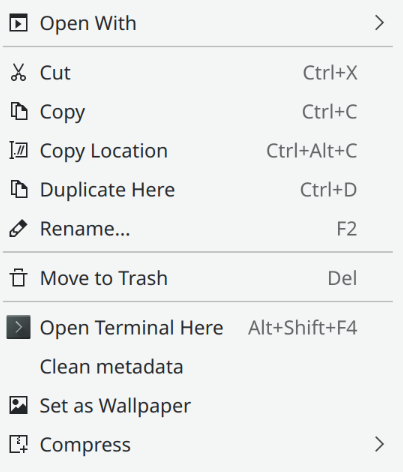 missingicon.png
(50.3 KiB)
missingicon.png
(50.3 KiB)
|


This task depends upon
Closed by kpcyrd (kpcyrd)
Wednesday, 18 October 2023, 09:05 GMT
Reason for closing: Fixed
Additional comments about closing: 0.13.4-2
Wednesday, 18 October 2023, 09:05 GMT
Reason for closing: Fixed
Additional comments about closing: 0.13.4-2