FS#52720 - [qt5ct] qt5ct v0.29-1 not picking up custom KDE color scheme
Attached to Project:
Community Packages
Opened by David Rosenstrauch (darose) - Thursday, 26 January 2017, 15:50 GMT
Last edited by Antonio Rojas (arojas) - Saturday, 28 January 2017, 10:20 GMT
Opened by David Rosenstrauch (darose) - Thursday, 26 January 2017, 15:50 GMT
Last edited by Antonio Rojas (arojas) - Saturday, 28 January 2017, 10:20 GMT
|
Details
The latest upgrade to qt5ct broke my color scheme.
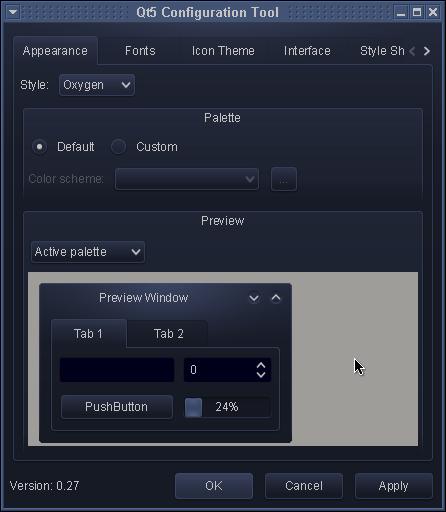
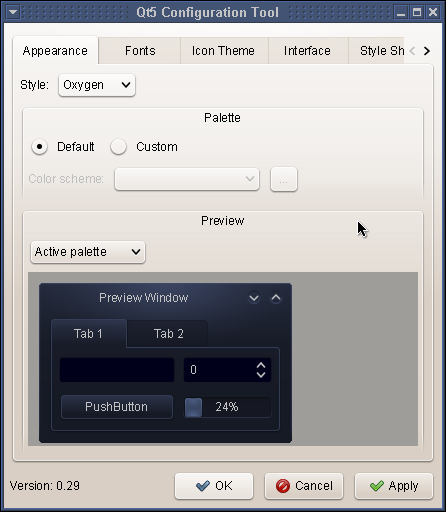
I run XFCE, but use many KDE apps. As a result, I use qt5ct to make a uniform look & feel. This requires setting "export QT_QPA_PLATFORMTHEME=qt5ct", which I have done in /etc/profile.d/qt5style.sh . The result is that all of my KDE/QT apps use my custom (dark) theme. See http://darose.net/qt5ct_v0_27.png for an example. However, the recent upgrade to qt5ct v0.29-1 broke this. See http://darose.net/qt5ct_v0_29.png for an example. Switching back to v0.27 instantly fixes the problem. Any ideas what broke and/or how to fix? |

This task depends upon
Closed by Antonio Rojas (arojas)
Saturday, 28 January 2017, 10:20 GMT
Reason for closing: Fixed
Additional comments about closing: qt5ct 0.29-3
Saturday, 28 January 2017, 10:20 GMT
Reason for closing: Fixed
Additional comments about closing: qt5ct 0.29-3
(See http://darose.net/qt5ct_v0_30.png)