FS#51248 - [gtk3][libreoffice-fresh][libreoffice-still] garbled font rendering
Attached to Project:
Arch Linux
Opened by Matt Price (matt.price) - Wednesday, 05 October 2016, 19:23 GMT
Last edited by Andreas Radke (AndyRTR) - Wednesday, 07 December 2016, 21:28 GMT
Opened by Matt Price (matt.price) - Wednesday, 05 October 2016, 19:23 GMT
Last edited by Andreas Radke (AndyRTR) - Wednesday, 07 December 2016, 21:28 GMT
|
Details
Description:
After a recent upgrade which included an upgrade to gnome-testing (3.22), fonts in libreoffice now spontaneously switch from a normal appearance to garbled nonsense (see image). THe garbling usually occurs after performing some kind of style- or format-related task. Once text is corrupted, it appears corrupted on-screen but exports to pdf without issue. If anyone has advice on how to debug Libreoffice or gtk, thanks very much for sharing it. Additional info: * GTK3 3.22.1-0 * libreoffice-fresh 5.2.2-1 or libreoffice-still 5.1.5-3 Steps to reproduce: Start Libreoffice Open file attempt to modify a style Behaviour is not seen in any other application (yet). 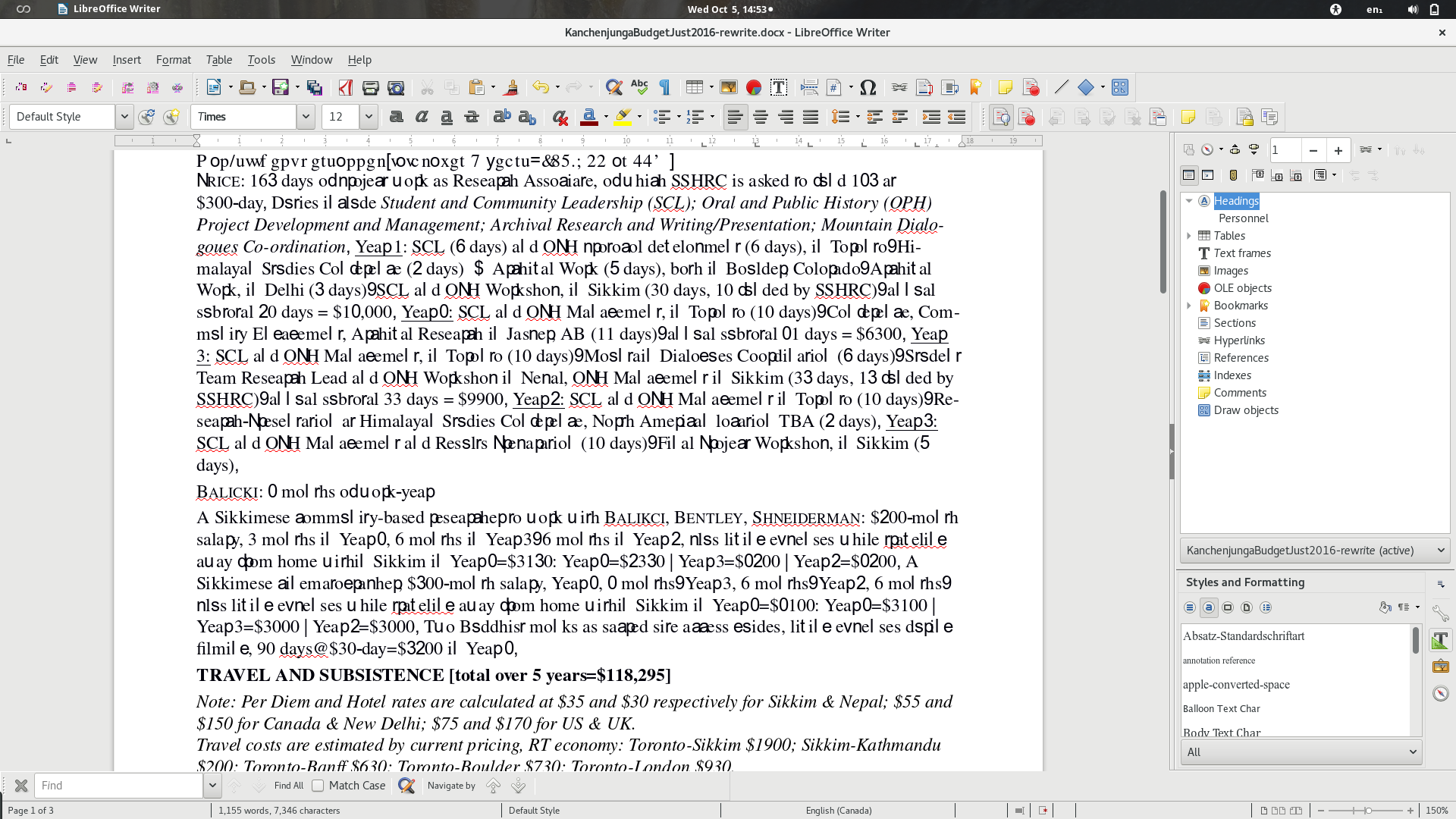 Screenshot from 2016-10-05 14...
(486.3 KiB)
Screenshot from 2016-10-05 14...
(486.3 KiB)
|

This task depends upon
pacman -Syyuu
to downgrade to gnome and gtk 3.20 fixed the problem for me. I've attached an etckeeper log which lists the full changeset for that operation (sorry if there's a better way to present this info -- I don't know it).
I'd be happy to experiment a bit with the testing repos if that would help track down the bug; please just tell me what to do and I'll follow directions.