FS#44103 - [xfce4] Windows manipulation troubles when using two screens
Attached to Project:
Arch Linux
Opened by David Kremer (dkremer) - Sunday, 08 March 2015, 21:05 GMT
Last edited by Evangelos Foutras (foutrelis) - Sunday, 15 March 2015, 11:59 GMT
Opened by David Kremer (dkremer) - Sunday, 08 March 2015, 21:05 GMT
Last edited by Evangelos Foutras (foutrelis) - Sunday, 15 March 2015, 11:59 GMT
|
Details
I currently use two screens : a laptop screen on the left
and a VGA 1280x1024 ACER screen on the right.
I started setting things up right after the upgrade from xfce 4.10 to 4.12 as it is shown in the attachment. Now, the trouble is that the window manager does not its job on the right screen (VGA, 1280x1024). I don't know exactly why, but I have (at least) two problems : 1. Maximize a window in order to make it fit to the screen does not work. 2. I am unable to navigate the menu for some applications as soon as they are localized on the right screen (File, Edit, View, ... are not opening when I click on). This happened to me in particular with kolourpaint (a kde app). Actually it seems to happen only with QT apps, GTK apps are fine (but I still cannot maximize them). Notice that this problems are not active when I am on the laptop screen, only when the app is sitting on the right screen. 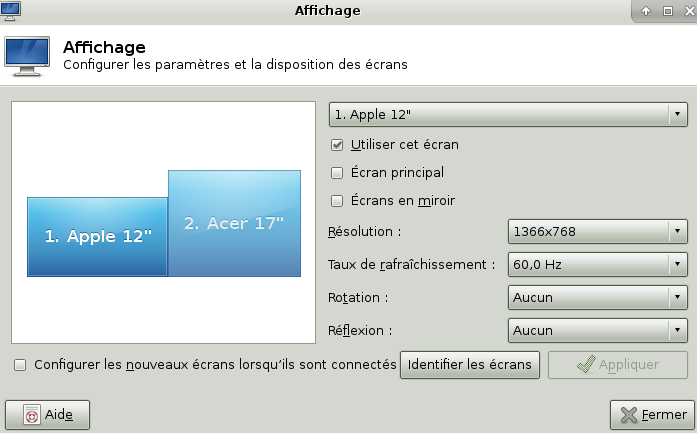 snapshot2.png
(46.6 KiB)
snapshot2.png
(46.6 KiB)
|

This task depends upon
Closed by Evangelos Foutras (foutrelis)
Sunday, 15 March 2015, 11:59 GMT
Reason for closing: Fixed
Additional comments about closing: xfwm4 4.12.1-1
Sunday, 15 March 2015, 11:59 GMT
Reason for closing: Fixed
Additional comments about closing: xfwm4 4.12.1-1
 Comment by David Kremer (dkremer) -
Sunday, 08 March 2015, 21:54 GMT
Comment by David Kremer (dkremer) -
Sunday, 08 March 2015, 21:54 GMT
A final comment : if I select the biggest screen (ie the ACER
screen) as being "main screen" (écran principal on the snapshot),
everything is now solved.
Comment by
Evangelos Foutras (foutrelis) -
Monday, 09 March 2015, 08:08 GMT
Can you report the issue to the Xfce Bugzilla? (Though I'm not
sure if it should be filed against xfwm4 or xfce4-settings.)
Comment by Nicolas I. (IooNag) -
Tuesday, 10 March 2015, 03:42 GMT
I'm hitting the same bug when using two screens after upgrading to
XFCE 4.12. Searching "maximize" in
https://bugzilla.xfce.org/
shows an awful amount of bugs related to maximizing windows (for
xfwm4) so I won't be surprised if something changed in 4.12 to fix
some of them and also introduced this bug in dual-screen
configuration. Did you report the bug on
https://bugzilla.xfce.org/
?
Comment by
Evangelos Foutras (foutrelis) -
Sunday, 15 March 2015, 09:22 GMT
Please update to xfwm4 4.12.1-1 and check if either issue is
fixed.
Comment by David Kremer (dkremer) -
Sunday, 15 March 2015, 11:57 GMT
Fixed for me.