FS#42204 - [xfce4-session] cursor artifacts in evolution compose window
Attached to Project:
Arch Linux
Opened by krimson (krimson) - Wednesday, 01 October 2014, 12:02 GMT
Last edited by Jan de Groot (JGC) - Monday, 13 October 2014, 09:11 GMT
Opened by krimson (krimson) - Wednesday, 01 October 2014, 12:02 GMT
Last edited by Jan de Groot (JGC) - Monday, 13 October 2014, 09:11 GMT
|
Details
Description:
In evolution in the compose window, when moving the cursor around using the keyboard the cursor will often leave artifacts, making it difficult to see where the actual cursor is at. Additional info: 1) Tested with evolution packages 3.12.5-1 2) Downgraded to evolution 3.10.4-1, issue is present in that version as well 3) Running under XFCE4, font settings & selected theme have no influence 4) evolution 3.10 in Fedora20 does not have the issue Steps to reproduce: 1) Install evolution 2) Setup an account 3) Compose a new message 4) Type some text, and navigate around using the cursor keys, home & end 5) It is most notable when adding a few empty lines in your text 6) You will see cursor artifacts show up See attached screenshot. The yellow marked bits show the artifacts, the actual cursor is somewhere else (not visible in the screenshot) The artifacts seem to disappear when you minimize and then maximize the compose window 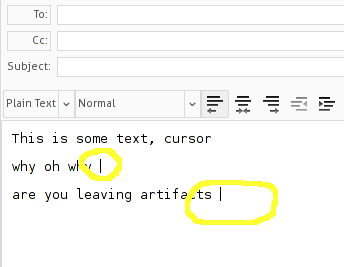 evolution-cursor-artifacts.png
(8.7 KiB)
evolution-cursor-artifacts.png
(8.7 KiB)
|

This task depends upon
Closed by Jan de Groot (JGC)
Monday, 13 October 2014, 09:11 GMT
Reason for closing: Fixed
Additional comments about closing: gtkhtml4 4.8.5
Monday, 13 October 2014, 09:11 GMT
Reason for closing: Fixed
Additional comments about closing: gtkhtml4 4.8.5
I tested on a clean XFCE environment by creating a new user, logging in as that user and then starting XFCE & Evolution. The problem is present in that situation as well.