FS#37266 - 2013.10.01 x64 - KDE - 'Desktop Switch On-Screen Display' Goes Blank
Attached to Project:
Arch Linux
Opened by archtime (archtime) - Wednesday, 09 October 2013, 11:17 GMT
Last edited by Gerardo Exequiel Pozzi (djgera) - Sunday, 13 October 2013, 19:34 GMT
Opened by archtime (archtime) - Wednesday, 09 October 2013, 11:17 GMT
Last edited by Gerardo Exequiel Pozzi (djgera) - Sunday, 13 October 2013, 19:34 GMT
|
Details
Description:
2013.10.01 x64 - KDE - Desktop Switch On-Screen Display Goes Blank Additional info: 2013.10.01 x64 - KDE Full install Steps to reproduce: I just installed 2013.10.01 x64 with a KDE Full install and I added the Pager widget to the taskbar, and in the Pager settings I checked to enable the 'Desktop Switch On-Screen Display' and the 'Show desktop layout indicators' is unchecked, then for the shortcuts, 'Switch to Next Desktop' & 'Switch to Previous Desktop' I added 'Ctrl+Alt+Right' & 'Ctrl+Alt+Left'. Then I noticed when moving back and forth across the desktop with either the shortcut keys, or placing my mouse over the pager and using the mousewheel, as soon as the Desktop Switch On-Screen Display dissapeared, if at that exact moment I used the keyboard or the mouse to move again, this time the Desktop Switch On-Screen Display would appear blank, black in color. I really rely on this nice function to help show me which desktop I'm on, and I do a lot of fast moving around at times, so it's really anonying this goes blank if you try to move the second it leaves the screen. Typically I have to wait a few seconds after it's gone to move if I want to see it. I don't know if this good be releated to graphics as well but I'm using the nvidia 325 drivers that I installed today on a GTX460 chip. Please see the attached screen shot pager_switcher.jpeg I hope this issue can be fixed soon... THANKS 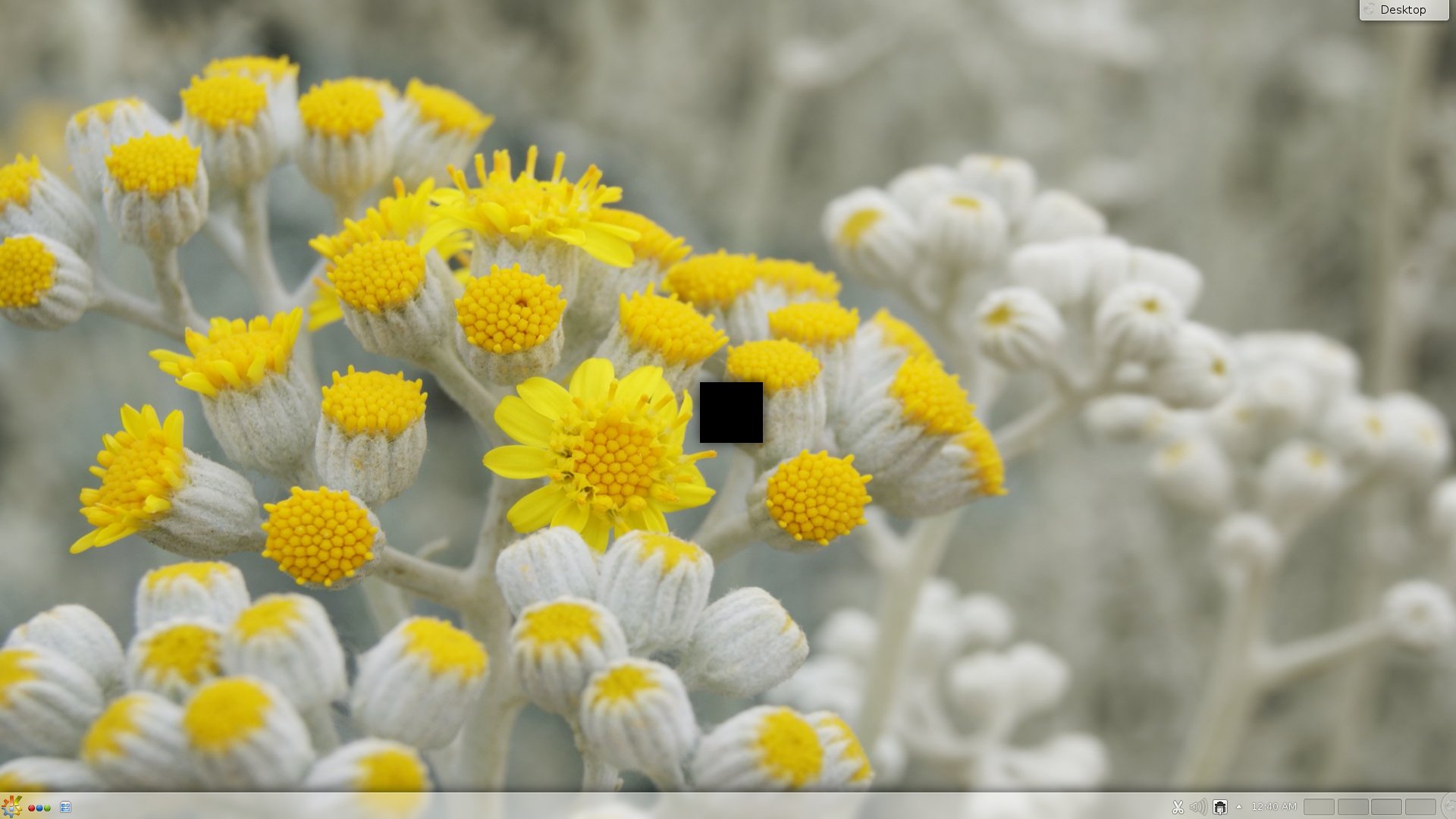 pager_switcher.jpeg
(184.2 KiB)
pager_switcher.jpeg
(184.2 KiB)
|

This task depends upon
Closed by Gerardo Exequiel Pozzi (djgera)
Sunday, 13 October 2013, 19:34 GMT
Reason for closing: Upstream
Additional comments about closing: https://bugs.kde.org/show_bug.cgi?id=325 939
Sunday, 13 October 2013, 19:34 GMT
Reason for closing: Upstream
Additional comments about closing: https://bugs.kde.org/show_bug.cgi?id=325 939
Is this related to
FS#37164? If so, it should be fixed in 4.11.3.2013.10.01 x64 is the Arch Linux version I just installed from the other day.
I found out what the problem is, it's the 'Fade' effects feature this is what's causing the 'Desktop Switch On-Screen Display' to appear black.
Also I noticed in the 'System Setting's when the 'Fade' is enabled, the small black popup windows that give a description of each section that appears when you hover your mouse over a section, when you move the mouse off one the sections and move it to another the black popup window will jitter/shake slightly, personally I can really see the shaking of these popup windows, this also needs to be fixed.
Not sure if these 'Fade' problems are something the Arch developers can fix or it needs to come upstream from the KDE developers...
Please see the attached screen shot; 'system-settings.jpg, you'll notice the popup window for the 'Shortcut and Gestures', that's the popup I was referring to that shakes.
THANKS
It does sound like something you need to take upstream.
Ok wasn't sure if Arch Team did any patching or fixing on KDE, it is the 'Fade' effect...
Thanks