FS#26184 - [audacious] 3.0.3-1 : cannot select any used-added Winamp 2.x skin
Attached to Project:
Arch Linux
Opened by Laurent Pointecouteau (hellpe) - Saturday, 01 October 2011, 20:39 GMT
Last edited by Gaetan Bisson (vesath) - Monday, 03 October 2011, 21:55 GMT
Opened by Laurent Pointecouteau (hellpe) - Saturday, 01 October 2011, 20:39 GMT
Last edited by Gaetan Bisson (vesath) - Monday, 03 October 2011, 21:55 GMT
|
Details
Description:
I've pasted some old Winamp 2.x (from an old Windows setup ; so I can confirm those were working on genuine Winamp 2.91) into /usr/share/audacious/Skins, as suggested in https://wiki.archlinux.org/index.php/Audacious#Adding_winamp_skins - but even if I can select them into the skin browser, there's no visible change to the interface, it keeps using the last selected working skin. Actually, only the ones included in the package seem to be working. Alternatively, I've tried to unzip a *wsz file into his own subfolder. I've also pasted some skins into ~/.local/share/audacious/Skins/, without success. Additional info: * audacious 3.0.3-1 for x86_64 - I'm running a fresh (installed 3 days ago from netinstall) Arch setup. I'm also using Gnome 3.0.2 as my DE ; * forum thread (statred by another user, but seems to be related) : https://bbs.archlinux.org/viewtopic.php?id=102812 Steps to reproduce: * Copy a Winamp 2.x skin into either /usr/share/audacious/Skins or ~/.local/share/audacious/Skins/ ; * Open Audacious, then View > Interface Preferences... * Select the skin you've just pasted. 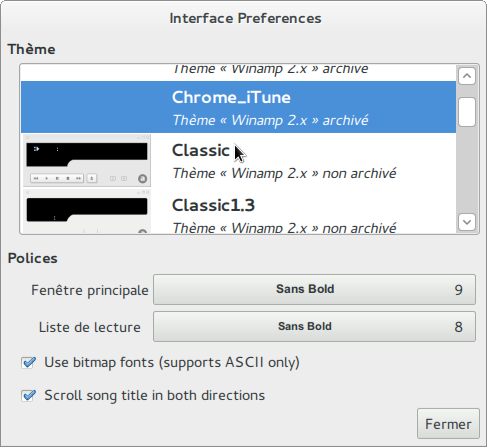 Capture-Interface Preferences...
(51.8 KiB)
Capture-Interface Preferences...
(51.8 KiB)
|

This task depends upon
 Comment by Gaetan Bisson (vesath) -
Sunday, 02 October 2011, 01:52 GMT
Comment by Gaetan Bisson (vesath) -
Sunday, 02 October 2011, 01:52 GMT
Please report this bug upstream; it doesn't seem like we can do
much about this packaging-wise.
Comment by
John Lindgren (jlindgren) - Sunday,
02 October 2011, 02:37 GMT
I am the upstream maintainer and can confirm that user skins are
not working right in the Git version. I will add this to my TODO
list, but it may be a while before I get to it. As Gaetan said, it
would be nice to have this copied to an upstream report. Also, the
old forum thread is probably not related.