Arch Linux

Please read this before reporting a bug:
https://wiki.archlinux.org/title/Bug_reporting_guidelines

Do NOT report bugs when a package is just outdated, or it is in the AUR. Use the 'flag out of date' link on the package page, or the Mailing List.

REPEAT: Do NOT report bugs for outdated packages!
Tasklist

FS#2225 - nautilus file browser tree-view icon corruption

Attached to Project: Arch Linux
Opened by Ash (Thikasabrik) - Thursday, 17 February 2005, 21:02 GMT
Last edited by Jan de Groot (JGC) - Monday, 21 February 2005, 08:03 GMT
Task Type Bug Report
Category Packages: Current
Status Closed
Assigned To Jan de Groot (JGC)
Architecture not specified
Severity Low
Priority Normal
Reported Version 0.7 Wombat
Due in Version Undecided
Due Date Undecided
Percent Complete 0%
Votes 0
Private No

Details

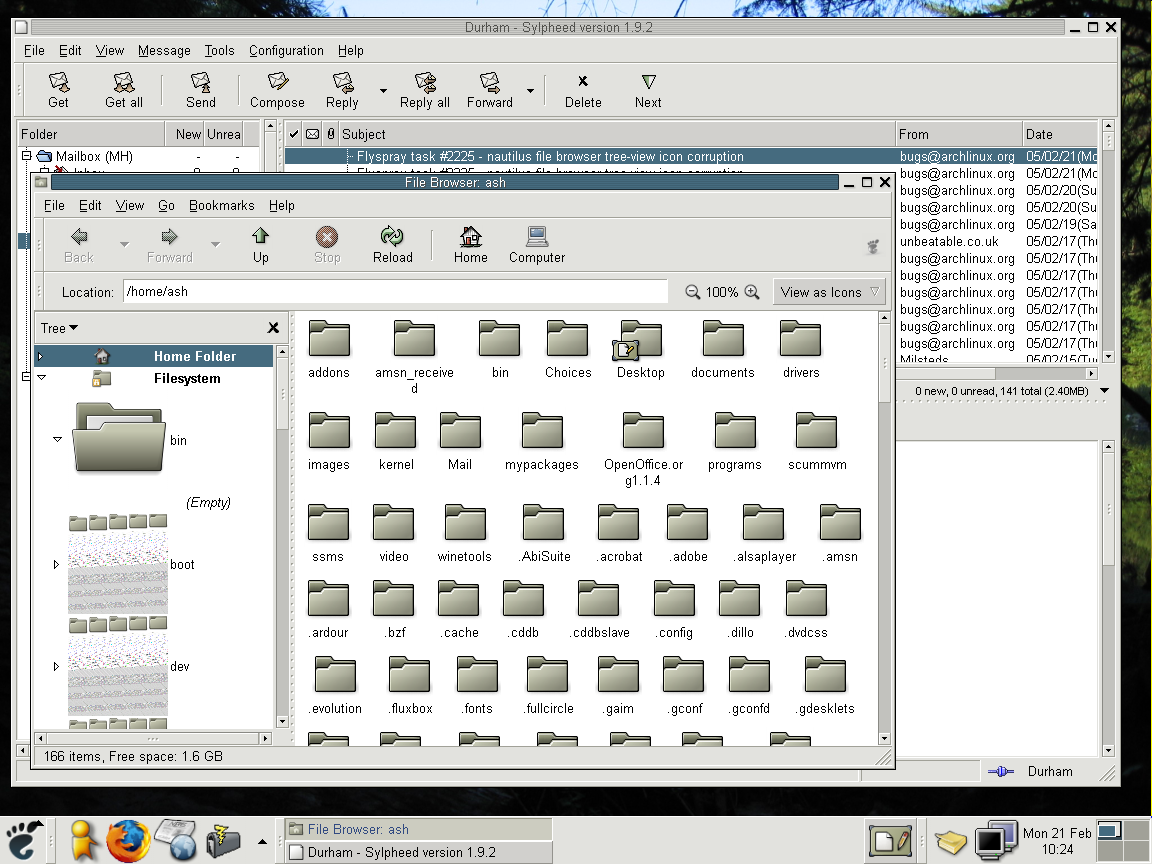
I don't know how long this has been there, since I haven't used nautilus' tree view for a while.. but at the moment the icon for a closed folder in the tree side-bar is corrupted and takes up a lot more screen space than it should. When opening a branch of the tree the correct icon for an opened folder appears, but it too is enormous. Odd... might have happened after that gnome-icon-theme update. Perhaps...
This task depends upon

Closed by  Jan de Groot (JGC)
Monday, 21 February 2005, 11:17 GMT
Reason for closing:  Fixed
Comment by Jan de Groot (JGC) - Thursday, 17 February 2005, 22:16 GMT
You get huge icons in the nautilus treeview? I have seen this during the gnome 2.9.x branch, and it seemed to be a bug in nautilus. Now that we have the new icon themes already in gnome 2.8 (it's only a few icons, we have the 2.9 themes also and the gtk 2.6), this also occurs in nautilus 2.8.x. I think it's a change in the stock icons that causes nautilus versions to give these huge icons. I will look for a patch for this problem.
Comment by Jan de Groot (JGC) - Monday, 21 February 2005, 08:03 GMT
I can't reproduce this on my last gnome 2.8 install I have left. Could you upload a screenshot?
Comment by Ash (Thikasabrik) - Monday, 21 February 2005, 10:25 GMT
There you go. Perhaps it requires a certain theme.. I'm using simple. Ah yes - it seems gorilla works fine, so it's to do with the 'GNOME' icon set.
Comment by Jan de Groot (JGC) - Monday, 21 February 2005, 11:14 GMT
I'm using gorilla ;)
It's a problem with the scalable icons in the simple theme. I'm making a new package with fixed icons now.

Loading...
