FS#15503 - [xf86-video-intel] Opacity window displays incorrectly with version 2.7.99.901-1
Attached to Project:
Arch Linux
Opened by Jun Wu (quark) - Tuesday, 14 July 2009, 09:16 GMT
Last edited by Jan de Groot (JGC) - Saturday, 21 November 2009, 19:07 GMT
Opened by Jun Wu (quark) - Tuesday, 14 July 2009, 09:16 GMT
Last edited by Jan de Groot (JGC) - Saturday, 21 November 2009, 19:07 GMT
|
Details
Description:
Windows with opacity property display incorrectly after upgrading xf86-video-intel to 2.7.99.901-1. (Refer to the attachment, sonata with opacity = 0.75.) xf86-video-intel 2.7.1-1 works fine. Hardware: Intel GMA 950 Mobile Additional info: * package version(s) xf86-video-intel 2.7.99.901-1 intel-dri 7.4.4-1 libgl 7.4.4-1 mesa 7.4.4-1 * config and/or log files etc. xorg.conf: Section "Module" Load "vbe" Load "glx" EndSection Section "Files" FontPath "/usr/share/fonts/local" EndSection Section "Monitor" Identifier "Monitor1" EndSection Section "Device" Identifier "GMA950" Driver "intel" Option "DRI" "true" Option "FramebufferCompression" "false" EndSection Section "Screen" Identifier "Main Screen" Device "GMA950" Monitor "Monitor1" DefaultDepth 24 Subsection "Display" Depth 24 Modes "1280x800" "1280x1024" "1024x768" "800x600" "640x480" Virtual 1280 1824 EndSubsection EndSection Section "ServerLayout" Identifier "Simple Layout" Screen "Main Screen" Option "AIGLX" "true" EndSection Section "DRI" Mode 0666 EndSection Section "Extensions" Option "Composite" "Enable" EndSection Steps to reproduce: 1. Enable composition (using compiz, etc.) 2. Use compiz's opacity plugin or 'transset' command-line tool to set opacity of a window 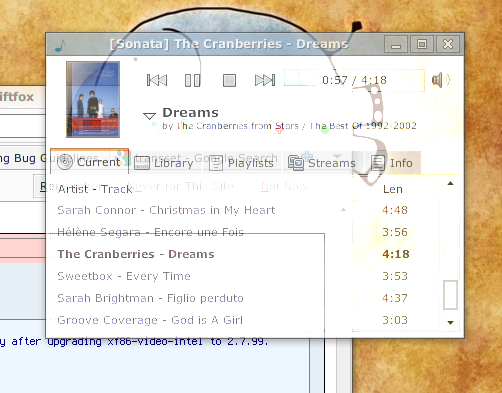 x.png
(137.8 KiB)
x.png
(137.8 KiB)
|

This task depends upon
Maybe this problem should belong to compiz?
Controls of this window are ugly. While the picture it contains draws correctly.
I tried Qt applications, the menu bar draws good, while text boxes and some other parts have similar problems.
It seems it's a problem related to so many things -.-
Screen image just freeze (no refresh) under compiz, except for the mouse pointer (other WMs work well, such as xfwm4, with or without composition).
Switching VT using Ctrl - Alt - Fx and switching back can make the screen refresh one time.
I have also tried aur/xf86-video-intel-git 20090811-1, it just looks the same.
At present, I am using aur/xf86-video-intel-stable 2.7.1-4, no problem except OpenGL application indirect rendering issue (known issue in this version, and resolved in 2.7.99 and above version).