FS#14433 - xf86-video-intel trace artefacts to screen
Attached to Project:
Arch Linux
Opened by Yuriy Vashchuk (YVaschuk) - Thursday, 23 April 2009, 07:18 GMT
Last edited by Roman Kyrylych (Romashka) - Sunday, 31 May 2009, 12:32 GMT
Opened by Yuriy Vashchuk (YVaschuk) - Thursday, 23 April 2009, 07:18 GMT
Last edited by Roman Kyrylych (Romashka) - Sunday, 31 May 2009, 12:32 GMT
|
Details
Description:
I have this problem from long time (3-6 month I think). Computer: Dell Latitude C400 (P3-M 1GHz, intel 830M) After a boot I have the artifacts at my screen. The artifacts multiples when I scroll page or move window. Screenshot-1.png - just after the boot. Screenshot-2.png - after the window moving Screenshot-4.png - I start glxgears from terminal (I can't see the glx..window) I have the same problem with xf86-video-intel-newest (2.7.0-3). Both drivers (xf86-video-intel and xf86-video-intel-newest) don't work with clean xorg.conf (without additional options in Device section). For solving problem, I use xf86-video-intel-legacy. For this driver, I don't have the image artifacts, but sometimes I have some font artifacts. I don't use a Compiz. Additional info: * package version(s) xf86-video-intel (2.6.3-3) intel-dri (7.4-2) libdrm (2.4.9-1) mesa (7.4-1) metacity (2.26.0-1) xorg-server (1.6.1-1) xorg-xinit (1.1.1-1) xorg-apps (7.4-2) * config and/or log files etc. /etc/X11/xorg.conf ------------------ Section "ServerLayout" Identifier "Layout0" Screen 0 "Screen0" InputDevice "Keyboard0" "CoreKeyboard" InputDevice "Mouse0" "CorePointer" EndSection Section "Files" RgbPath "/usr/share/X11/rgb" ModulePath "/usr/lib/xorg/modules" FontPath "/usr/share/fonts/cyrillic" FontPath "/usr/share/fonts/local" FontPath "/usr/share/fonts/misc" FontPath "/usr/share/fonts/75dpi" FontPath "/usr/share/fonts/100dpi" FontPath "/usr/share/fonts/TTF" FontPath "/usr/share/fonts/Type1" EndSection Section "Module" Load "xtrap" Load "glx" Load "dbe" Load "dri" Load "extmod" Load "freetype" EndSection Section "InputDevice" # generated from default Identifier "Mouse0" Driver "mouse" Option "Emulate3Buttons" "true" EndSection Section "InputDevice" Identifier "Synaptics Touchpad" Driver "synaptics" Option "SendCoreEvents" "true" Option "Device" "/dev/psaux" Option "Protocol" "auto-dev" Option "HorizEdgeScroll" "0" # Motion speed is too slow by default Option "MinSpeed" "0.45" Option "MaxSpeed" "0.75" Option "AccelFactor" "0.020" #To enable vertical scroll, define (at least) right side "edge" limit. #Other values are usefull for "Edge Motion" #Option "RightEdge" "5300" Option "RightEdge" "830" Option "LeftEdge" "135" Option "TopEdge" "120" Option "BottomEdge" "715" Option "EdgeMotionMinSpeed" "100" Option "EdgeMotionMaxSpeed" "400" #Special features, disabled by default. see manpage (5)synaptics #Option "EdgeMotionUseAlways" "0" #Option "UpDownScrolling" "0" #Option "LeftRightScrolling" "0" #Option "CircularScrolling" "0" #Option "CoastingSpeed" "0" EndSection Section "InputDevice" # generated from default Identifier "Keyboard0" Driver "kbd" Option "XkbRules" "xorg" Option "XkbModel" "latitude" Option "XkbLayout" "gb" EndSection Section "Device" Identifier "Device0" Driver "intel" VendorName "Intel Corporation" BoardName "82830 CGC [Chipset Graphics Controller]" VideoRam 32768 BusID "PCI:0:2:0" Option "DRI" "true" Option "NoDDC" "true" Option "NoAccel" "false" Option "EnablePageFlip" "true" Option "RenderAccel" "true" Option "AccelMethod" "EXA" Option "MigrationHeuristic" "greedy" Option "ExaNoComposite" "true" EndSection Section "Monitor" Identifier "Monitor0" VendorName "Unknown" ModelName "Unknown" Option "DPMS" EndSection Section "Screen" Identifier "Screen0" Device "Device0" Monitor "Monitor0" DefaultDepth 24 SubSection "Display" Depth 24 Modes "1024×768" "800×600" "640×480" EndSubSection EndSection Section "Extensions" Option "Composite" "Enable" EndSection Thanks for attention.  Screenshot-1.png
(105.7 KiB)
Screenshot-1.png
(105.7 KiB)
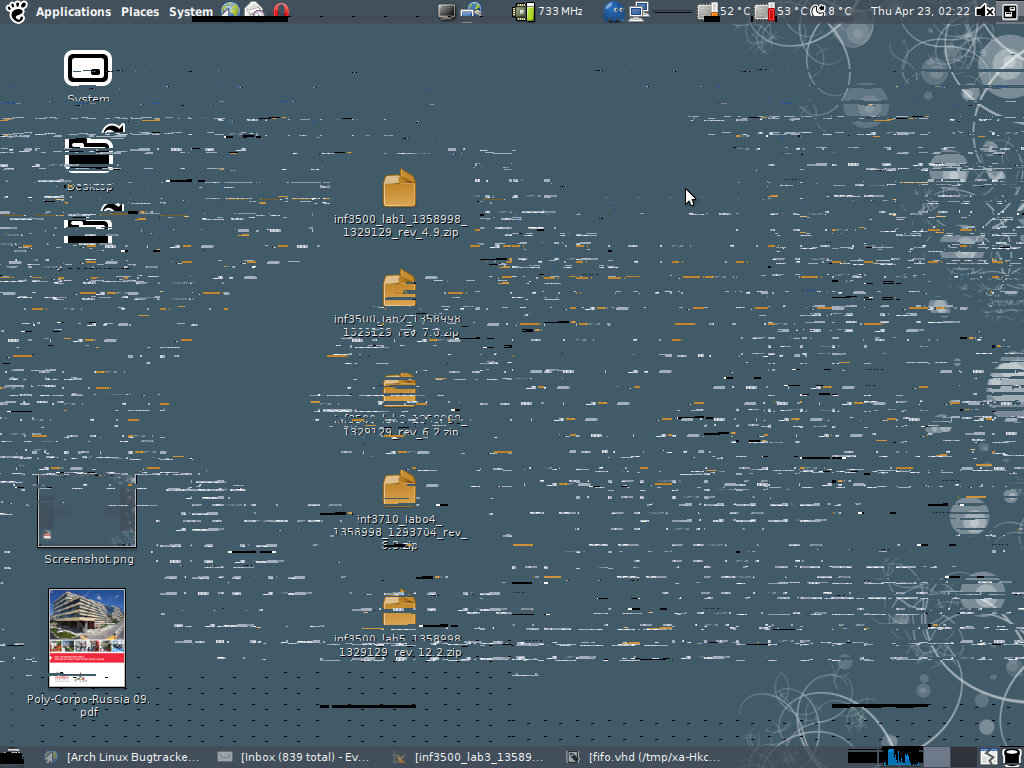 Screenshot-2.png
(197.9 KiB)
Screenshot-2.png
(197.9 KiB)
 Screenshot-4.png
(159.5 KiB)
Screenshot-4.png
(159.5 KiB)
 xorg.conf
(2.6 KiB)
xorg.conf
(2.6 KiB)
|

This task depends upon
Closed by Roman Kyrylych (Romashka)
Sunday, 31 May 2009, 12:32 GMT
Reason for closing: Fixed
Additional comments about closing: closed on author's request, see last comments
Sunday, 31 May 2009, 12:32 GMT
Reason for closing: Fixed
Additional comments about closing: closed on author's request, see last comments
http://aur.archlinux.org/packages.php?ID=22968
I will try with migrationHeuristic option later.
Note that Intel doesn't put much interest in 8xx chipsets, and even pre-965 9xx chipsets are not their main concern. Development is focused on G965 and up. That's why we have this legacy driver in the repositories.
I delete composite section and I add Option "DRI" "false".
I don't see any artifacts at screen and for fonts. I can work and I'm happy.
You can close this bug.
My current config for others:
==================
Section "ServerLayout"
Identifier "Layout0"
Screen 0 "Screen0"
InputDevice "Keyboard0" "CoreKeyboard"
InputDevice "Mouse0" "CorePointer"
EndSection
Section "Files"
RgbPath "/usr/share/X11/rgb"
ModulePath "/usr/lib/xorg/modules"
FontPath "/usr/share/fonts/cyrillic"
FontPath "/usr/share/fonts/local"
FontPath "/usr/share/fonts/misc"
FontPath "/usr/share/fonts/75dpi:unscaled"
FontPath "/usr/share/fonts/100dpi:unscaled"
FontPath "/usr/share/fonts/TTF"
FontPath "/usr/share/fonts/Type1"
EndSection
Section "Module"
Load "xtrap"
Load "glx"
Load "dbe"
Load "dri"
Load "extmod"
Load "freetype"
EndSection
Section "InputDevice"
# generated from default
Identifier "Mouse0"
Driver "mouse"
Option "Emulate3Buttons" "true"
EndSection
Section "InputDevice"
Identifier "Synaptics Touchpad"
Driver "synaptics"
Option "SendCoreEvents" "true"
Option "Device" "/dev/psaux"
Option "Protocol" "auto-dev"
Option "HorizEdgeScroll" "0"
# Motion speed is too slow by default
Option "MinSpeed" "0.45"
Option "MaxSpeed" "0.75"
Option "AccelFactor" "0.020"
#To enable vertical scroll, define (at least) right side "edge" limit.
#Other values are usefull for "Edge Motion"
#Option "RightEdge" "5300"
Option "RightEdge" "830"
Option "LeftEdge" "135"
Option "TopEdge" "120"
Option "BottomEdge" "715"
Option "EdgeMotionMinSpeed" "100"
Option "EdgeMotionMaxSpeed" "400"
#Special features, disabled by default. see manpage (5)synaptics
#Option "EdgeMotionUseAlways" "0"
#Option "UpDownScrolling" "0"
#Option "LeftRightScrolling" "0"
#Option "CircularScrolling" "0"
#Option "CoastingSpeed" "0"
EndSection
Section "InputDevice"
# generated from default
Identifier "Keyboard0"
Driver "kbd"
Option "XkbRules" "xorg"
Option "XkbModel" "latitude"
Option "XkbLayout" "gb"
EndSection
Section "Device"
Identifier "Device0"
Driver "intel"
VendorName "Intel Corporation"
BoardName "82830 CGC [Chipset Graphics Controller]"
VideoRam 32768
BusID "PCI:0:2:0"
Option "DRI" "false"
EndSection
Section "Monitor"
Identifier "Monitor0"
VendorName "Unknown"
ModelName "Unknown"
Option "DPMS"
EndSection
Section "Screen"
Identifier "Screen0"
Device "Device0"
Monitor "Monitor0"
DefaultDepth 24
SubSection "Display"
Depth 24
Modes "1024×768" "800×600" "640×480"
EndSubSection
EndSection
I suggest creating a page for you laptop in on the wiki (see http://wiki.archlinux.org/index.php/HCL/Laptops) - this way it will be easier for people to find it.
Thank you for your efforts.