FS#11384 - Default GNOME after installing from the latest CD doesn't work correctly
Attached to Project:
Arch Linux
Opened by Matěj Týč (bubla) - Wednesday, 03 September 2008, 09:10 GMT
Last edited by Roman Kyrylych (Romashka) - Saturday, 06 September 2008, 07:46 GMT
Opened by Matěj Týč (bubla) - Wednesday, 03 September 2008, 09:10 GMT
Last edited by Roman Kyrylych (Romashka) - Saturday, 06 September 2008, 07:46 GMT
|
Details
Description:
The default GNOME starts in a very ugly form, you can see the screenshot. Among other things, the desktop background is set to display an image, but no image is there, just a bg colour. And widgets look very ugly, too. I have read about gnome in the wiki, I think that I couldn't have spoiled anything. Any ideas what could go wrong here? Any ideas? Additional info: * package version(s) latest versions of all * config and/or log files etc. Every setting is the default one. What logs can provide useful info? Steps to reproduce: Install GNOME using: pacman -S gnome gnome-extra 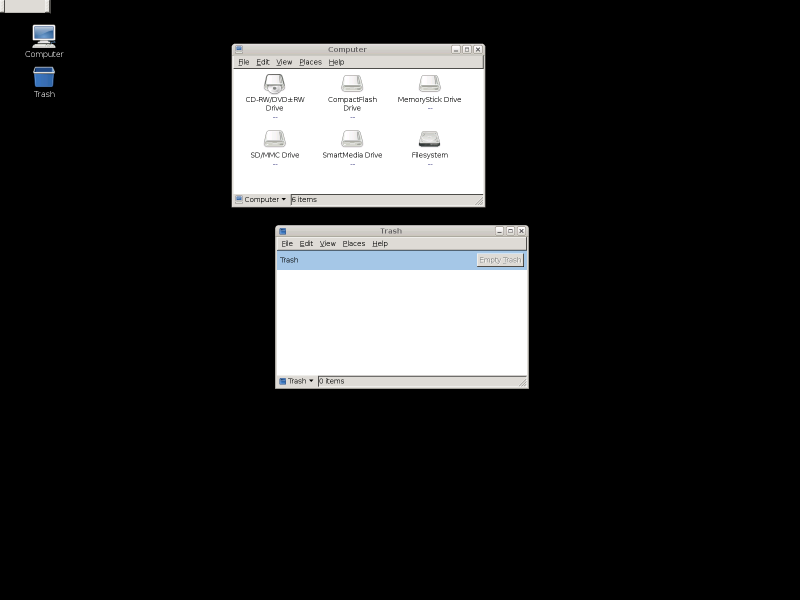 Screenshot.png
(22.5 KiB)
Screenshot.png
(22.5 KiB)
|

This task depends upon
Closed by Roman Kyrylych (Romashka)
Saturday, 06 September 2008, 07:46 GMT
Reason for closing: Not a bug
Saturday, 06 September 2008, 07:46 GMT
Reason for closing: Not a bug
Nautilus can't be used now, due to an unexpected error from Bonobo when attempting to locate the factory. Killing bonobo-activation-server and restarting Nautilus may help fix the problem.
I have the date set correctly, though...
Please see this wiki. Also make sure you have dbus and hal in your DAEMONS=() array in /etc/rc.conf
I have read the wiki page before and even hal and dbus were running. I still don't have any idea what was wrong though...
Maybe you didn't run pacman -Syu before installing Gnome?
I have no idea how this could happen, but it doesn't seem like a packaging bug.